Tuesday, October 30, 2012

Reflection 4

Introduction to Bioelectronics :)

'BIO'logy? Huh? (,"). I used to set in my mind there will be the bad day when I see 'BIO' word. This is because I do not like Biology subject. Therefore, I drop this subject when I join matriculation program. Once again, for this week I met  'BIO's word, but it's totally different. It's about 'BIOELECTRONICS'. Fine, I love electronics but what is the relationship between biology and electronics?


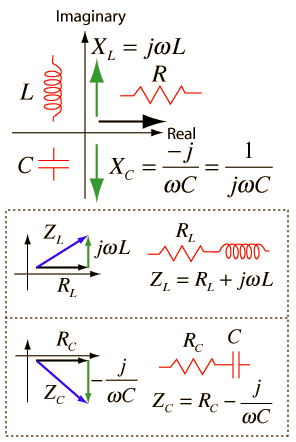
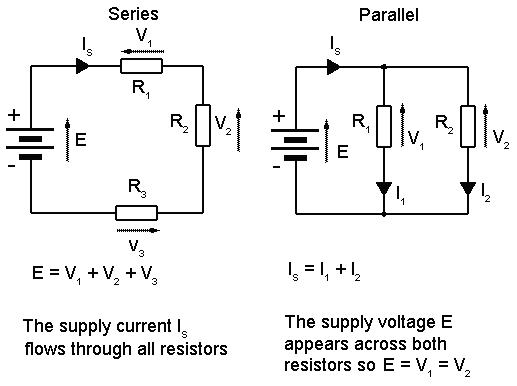
OK. This week we have a talk, a special talk from Dr. Azran and he had delivered a good speech about bioelectronics. I do not know why and how he can attract me to listen on his speech about this topic. Because I thought I am going to sleep in his class (even I know I am not going to do that =D). His introduction about this topic is not straight forward to bioelectronic itself. He gave us some information about electronic first, such as electronic symbol. There are many knowledge had to apply in order to master this symbol. Electronic system has many parts to learn and I have jotted down some of it, such as:

1. Resistor colour code


2. AC and DC


3. Impedance (Z)


4. Series and parallel circuit


5.  Voltage divider (transfer function)

6. RC circuit ( low-pass and high-pass)

7. Active element realization


We also have to answer some problem related to series and parallel circuit including capacitors and resistors. Derivation of trigonometry functions is required to solve the problem.-->(Please mastering your M.A.T.H.S) There was also estimation method that we have to analyze in order to get it function, that is Doppler Signal Discriminator.
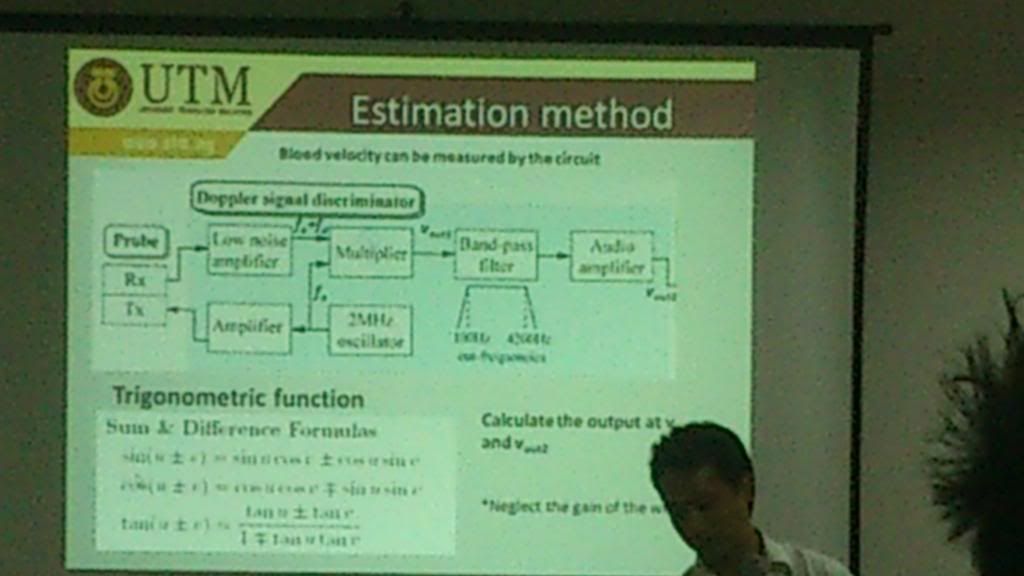
Doppler Signal Discriminator


8. Probe design

Example of probe design
Dr. Azran also had explained to us about molecular biology. The main point here is about cell staining. I do some research about this topic. What I understand is cell staining is a technique that can be used to better visualize cells and cell components under a microscope. For more information, please visit http://serc.carleton.edu/microbelife/research_methods/microscopy/cellstain.html. Here I put some pictures for cell staining :


Besides, he also shows us a video entitled 'Mechanics of Ascension'. This video tell us deeply about deoxyribonucleic acid (DNA) and its functions. There are so many DNA still not discovered yet, that also known as 'junk DNA'. 


We are also introduced to a winner of Noble Prize in Medicine in 2012. He is a Japanese physician and researcher of adult stem cells .He serves as the director of Center for iPS Cell Research and Application and a professor at the Institute for Frontier Medical Sciences at Kyoto University; as a senior investigator at the UCSF-affiliated J. David Gladstone Institutes in San Francisco, California; and as a professor of anatomy at University of California, San Francisco (UCSF). Yamanaka is also the current president of the International Society for Stem Cell Research (ISSCR). For more detail about him, please visit http://en.wikipedia.org/wiki/Shinya_Yamanaka

Shinya Yamanaka
Lastly, we also had been explained about the use of sonication treatment to completely decellularize blood artery. I also had search some information about this. Just definition it is. Sonication is the act of applying sound (usually ultrasound) energy to agitate particles in a sample, for various purposes. In the laboratory, it is usually applied using an ultrasonic bath or an ultrasonic probe, colloquially known as a sonicator. In a paper machine, an ultrasonic foil can distribute cellulose fibres more uniformly and strengthen the paper.
Please visit http://en.wikipedia.org/wiki/Sonication for more information :) .

That's all for today. I hope I can do my best to learn more about bioelectronics. I do not care even I have to study Biology as SPM. I learn from all my lecturers that we have to struggle and strive to achieve our goal.In addition,  I will not give up.  Because there is a success instead hardship :)

 "Although the road is long, we're going through it slowly."  -Anonymous-

Thanks a lot to Dr. Azran, Dr. Kamal and En. Redzuan :)


Thursday, October 25, 2012

Reflection 3

Ultiboard Has Made a Change :)

23/10/2012- This week we had learned how to convert from Multisim to Ultiboard. From the previous post, I had told you some about Multisim. Then this time I am going to tell you what is Ultiboard is about :) . In order to get a right information, I have done some 'googling'. Let me highlight here :


1. http://en.wikipedia.org/wiki/NI_Ultiboard:

NI Ultiboard or formerly ULTIboard is an electronic Printed Circuit Board Layout program which is part of a suite of circuit design programs, along with NI Multisim. One of its major features is the Real Time Design Rule Check, a feature that was only offered on expensive work stations in the days when it was introduced. ULTIboard was originally created by a company named Ultimate Technology, which is now a subsidiary of National Instruments. Ultiboard includes a 3D PCB viewing mode, as well as integrated import and export features to the Schematic Capture and Simulation software in the suite, Multisim.

2. http://www.ni.com/white-paper/5611/en

The NI Ultiboard interface enables efficient layout and routing of PCB designs. Integration with NI Multisim allows seamless transfer of schematics to layout. The customizable environment ensures accessibility to desired features for immediate productivity. Tools such as the spreadsheet view, toolbox and design wizards easily manage, control and define any board layout.


Part placement and copper routes are optimized to either allow full control for precise definition of critical parts or automation for quick design completion. The 3D preview renders a completed, populated board to gain a virtual perspective before production. Ultiboard exports and produces industry standard format such as Gerber and DXF to take a final, optimized board to prototype and manufacture.


The Ultiboard product editions (Full, Power Pro) provide a complete set of tools for professional PCB layout:

Intuitive, user-friendly design environment

Integrated spreadsheet view for managing design constraints, part placement, and copper routing

Easy-to-use design tools optimized for speed or precise control

Export to industry standard file formats such as Gerber and DXF for prototype and manufacturer.

In other words, Multisim and Ultiboard are closely related. Without the usage of Multisim, we cannot get the result in Ultiboard--> in form of 3D. Let me show you their closeliness :)

This is Multisim's front page :


In order to convert Multisim to Ultiboard, go to Transfer button. Select 'Transfer to Ultiboard', You will have this window appear:


This window is appearing in order to tell you what component you use and to confirm the number of component that you have use. After you click 'OK' button, the next window will be like this :


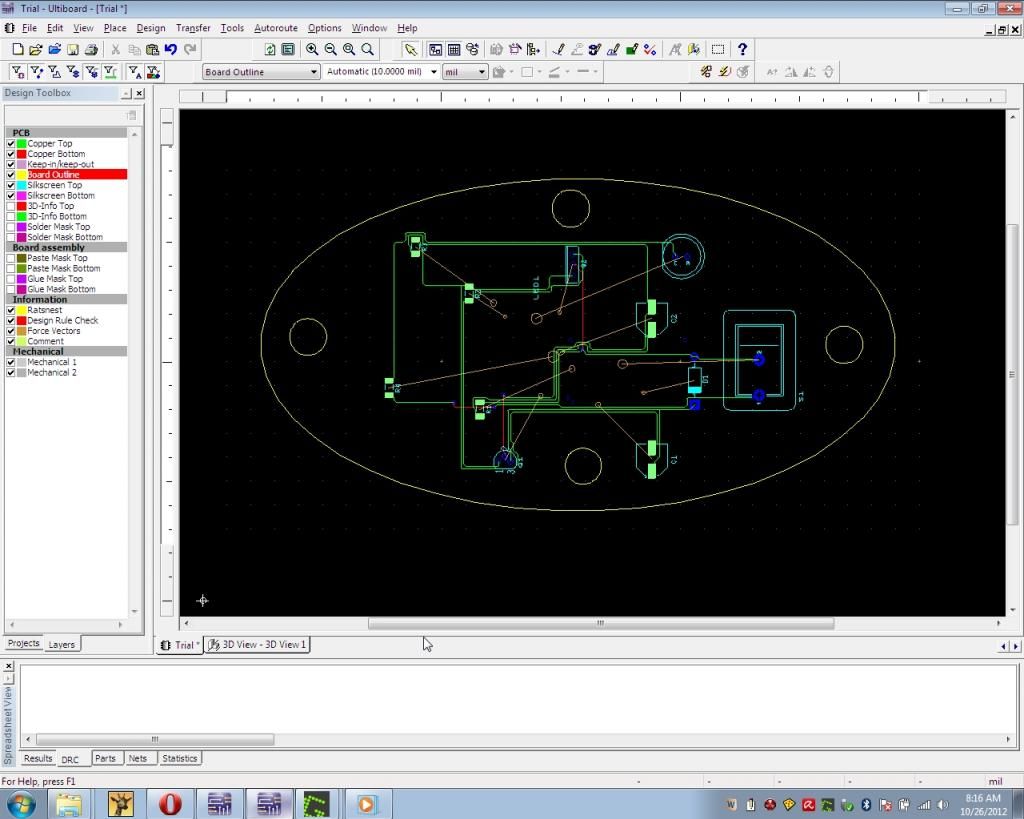
This step-by-step instruction had told you how the relationship between Multisim and Ultiboard. After done these 3 main steps, you can do whatever you wish for your Ultiboard. For example, I have finished design my components in the board. Have a look at this:


Then I convert it to 3D view. To do this, simply click 'Tools' then go to 'View 3D' button. This window will appear on your screen:


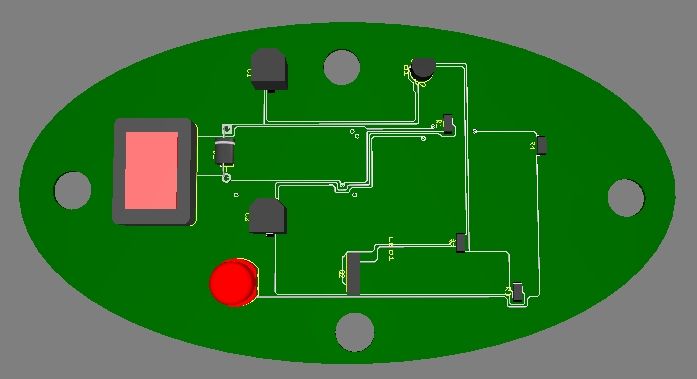
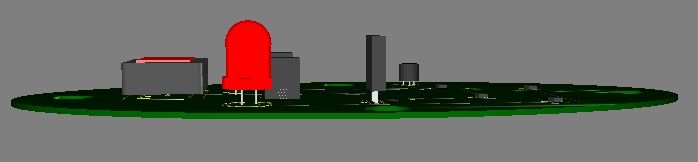
I also have captured some views from this 3D component. It included:
1. Upper view:
Upper view of 3D's component on the board.


2. Front view:
Front view of 3D's component on the board


3. The other side's view:
Other side of 3D's component on the board.

If I am not mistaken, this view is used for the soldering part. (For the next class, we will do some soldering and I cannot wait for that time! :) 

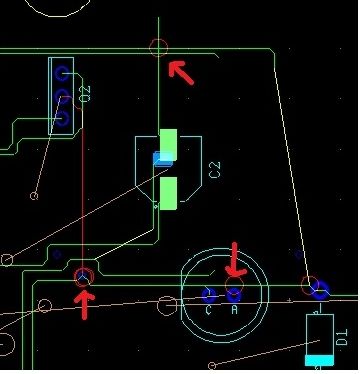
There are so many things have to be consider. In order to do some replacement of component, you will face some problem. This may include wrong connection of wire, DRC error (which the connection of wire is prohibited for some areas) and many more. Try to have a look on this circuit:

Some error of DRC.
The red arrows shows the errors that caused by the overlapping of point. You have to ensure that there is no DRC error before converting the diagram to 3D component. Otherwise, you will face some problem to do some changes on your circuit.

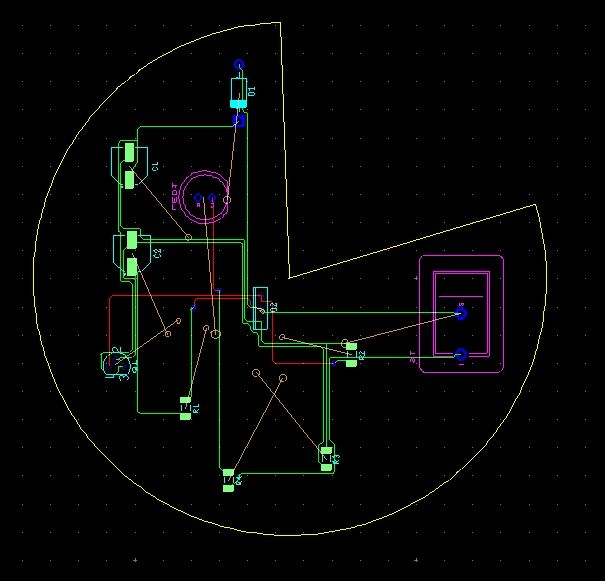
There are so many skills you have to learn to master this software. I have learned some of it, and this is the result I have obtained :)

Complete circuit :)

I will explain the diagram. The pink component means that component situated on the bottom of the copper layer. The other component without pink colour is situated on the upper of copper layer. The green wire means the wire situated on top of the copper layer. Also, red wire means the wire situated on bottom of the copper wire. Besides, the brown line means correct orientation for the component to connect. If you see any yellow wire, you have to made some adjustment. 

That's all for my workshop lesson this week. I am really interested to do more skills for this software. It challenges my mind and make me feel excited to explore more :) In order to be a professional engineer that will contribute to our lovely country, I will study hard! YEAH! 

- "Those who are successful are not those who failed in the attempt, not even those who often fail but those who never fail to try and keep trying until success we have achieved." - by Anonymous


Thanks a lot to Dr. Kamal and En. Redzuan :)

Monday, October 1, 2012

Reflection 2

It's all about MULTISIM :)

-Today's class start on 8:00 a.m. Why? (,'') --> Electronics subject, answer me!-


According to En. Redzuan, this week class will be held at Electronic Workshop. I am really excited when came to this workshop for this morning. There are many computers there, which I cannot sure; why in this workshop will have many computers. However, I expect to see some picture of electronics components with their functions; like diode, transistor, capacitor and etc. But it is not bad with '5S rules' and 'What You Have to do when getting electric shock' explanation on the whiteboard . Some of these all rules makes me be really careful for anything might be happen in the workshop.

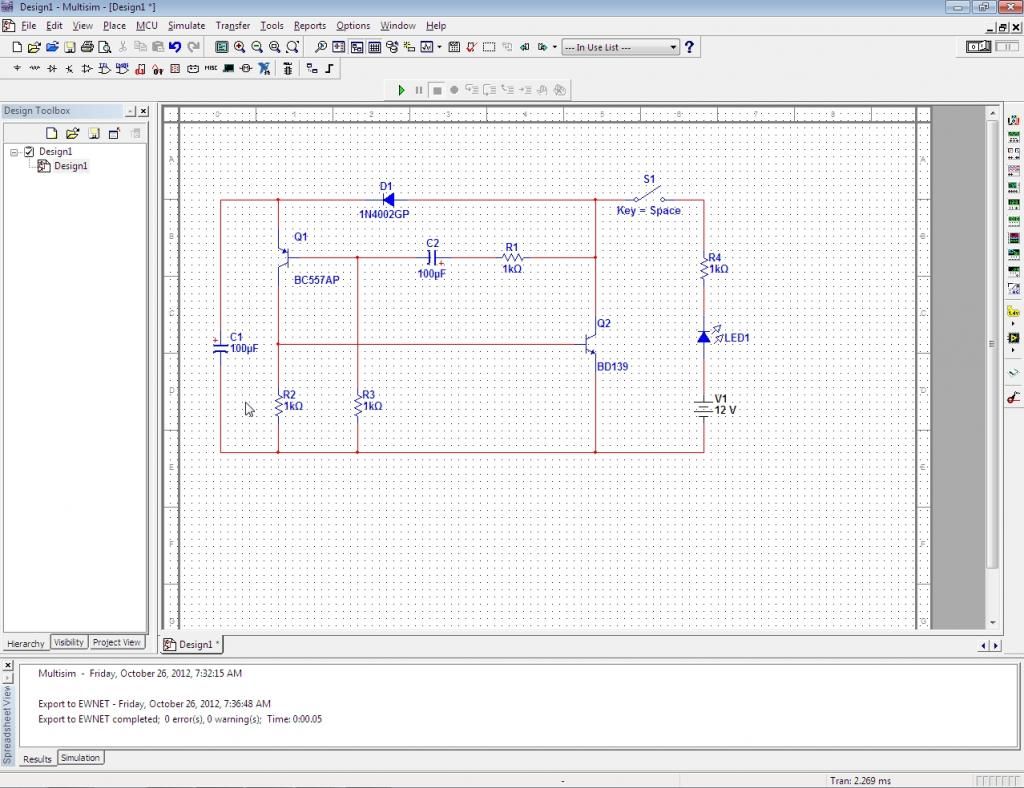
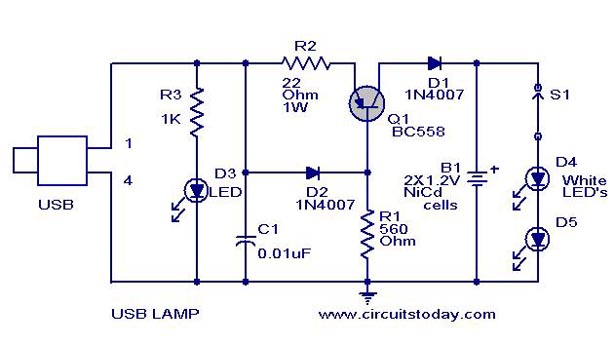
OK, that's all about Electronic Workshop that I can tell and feel the environment. Now, let's get started with En. Redzuan's class. Today, we are going to run Multisim software. MULTISIM? (,'') What kind of that software? Such a weird name. But we all are really lucky having En. Redzuan to brief some of the usage of this Multisim. He started with the introduction to Multisim. Actually this software is under National Instruments Corporation. You can refer this website in order to know more about NI.. http://en.wikipedia.org/wiki/National_Instruments .. --> Ask Mr. Wiki XD! After that, we started to search for some skills in Schematic Capture. This included 1. Opening and saving files. As you have been familiar with Microsoft's software such as Powerpoint, Word or Excel, you can use your experience using them to the same way as you open or save files in this software. There's no difference. Plus, you also can choose to save your project first or after your project done. But watch out for some PC, there will be some trouble in order to save your project. En. Redzuan had told us the software always get 'hang' and you cannot save your project if that problem arise. (Thank Allah, my PC really kind on me for this time :) ). 2.Placing the component. After all have been done about open and save files, we are going to place some electronics components with the given diagram. Oh, I almost forget. Once we enter the class this morning. En. Redzuan had spread one worksheet, that is WORKSHOP 2. There are two diagrams available there, but we only have to do the one without IC 555. The components that involves in this diagram is LED, transistor P-N-P and N-P-N, capacitors and also resistors. There also one buzzer involve, but we just ignore it as on request from En. Redzuan. (I also don't know whether the buzzer will works or not).

Example of electronic circuits.


That diagram just an example of what we had done this morning. There is a problem arise in order to get a real one picture. (Just use what I have :) ). The next is, 3. Wiring the circuit. In order to make sure the circuit functions well, we have to connect all the components in order to make it be a complete circuit. En. Redzuan had reminded us to be careful when we are going to connect from one component to another component. If you are unable to build correct connection, you will face some problem in stimulation step.
( My circuit works well with blinking LED :) . After we done the first three steps, we have to test our circuit whether it is functions or not. This is the last step, that is 4. Analysis. In this step, you have to make sure your component is connected correctly. You will see the result when the LED 'blinking' once you click 'run' on Stimulate options.

That's all about MULTISIM today :) I am really happy to get know on it. This software is about to train me to be a skillful and patient people. (Nice, isn't it? XD). I know it's not simple to use this software, but as a saying goes, 'Practice makes perfect' :) Just keep training and I'm sure I can do more connection on circuit diagram for the next workshop! (Insya Allah :D)

Before I leave this blog, I am glad to insert some of electronics component that have been use for our lesson :)

Transistors
Resistors
Diode
Switch SPST type
Power supply 9V

Capacitors


*Hard work will definitely pay off* 
-Kawato Koichi-

Thanks a lot to Dr. Kamal and En. Redzuan =)